Last updated: November 2026
Webinars have been around for decades and, just like almost anything that’s been around this long, they have evolved. Over the past years, webinars have seen a huge uptick and continue to gain popularity.
Allowing companies to engage with peers and customers across the globe, webinars are powerful tools to attract and engage with larger audiences, no matter where they are located.
But as you’re carefully crafting your message to retain relevance, language barriers can stand in the way of successfully communicating your webinar content across countries and cultures.
So how can you make your webinars multilingual? This guide shows you how to set it up on the platform you already use, step by step.
How to set up a multilingual webinar in six steps
- Choose your languages. Use your registration data, CRM or past attendance to see which languages your audience speaks, or ask for language preferences in your registration form.
- Choose the right language support. Professional interpreters are best for high-stakes or nuanced content. AI speech translation scales quickly to more languages, and live captions and subtitles support accessibility. Many webinars combine all three.
- Decide how attendees will access it. They can select their language inside your webinar platform, through an Interprefy widget, or on the Interprefy web platform or mobile app (see below).
- Prepare your interpreters and terminology. Share slides, speaker names, product names and acronyms in advance, so interpreters and AI-supported solutions get them right.
- Test before you go live. Run a rehearsal with speakers, interpreters and your host to check audio, language channels and access.
- Record and repurpose. Plan recordings and transcripts in each language from the start, so content is ready to share after the event.
How to add multilingual support on any meeting platform
Interprefy can help you in sourcing subject-savvy conference interpreters in your required languages, as well as providing the technology and support you need to facilitate webinar interpretation on any platform.
Depending on the platform you use, attendees can access interpretation, AI speech translation and captions in one of the following ways:
-
Interprefy Inject: Interprefy sends the interpreters’ audio and AI speech translation into the platform’s own language channels, so attendees simply select their language inside the meeting or webinar. See how it works with Zoom, Microsoft Teams and Webex.
-
Interprefy Agent (Microsoft Teams, Zoom, Google Meet and Webex): for AI speech translation and live captions in meetings, add Interprefy Agent like any other participant, before or during the meeting. It shares a link and QR code in the chat, so attendees can listen or read in their language on any device. The Agent isn’t available for registration-based webinars.
-
Interprefy Widget (virtual event and webinar platforms): on platforms such as GoToWebinar, an Interprefy panel is added to the event page. Attendees simply select their preferred language and mute the source audio. See which platforms Interprefy works with.
-
Interprefy’s own platform: if you’d rather not use a third-party platform, you can host your webinar on the Interprefy Web Platform, where attendees join with a single link in any browser.
Whichever option you choose, attendees who follow outside the meeting platform can use the Interprefy web platform in their browser or the Interprefy mobile app, by scanning a QR code or entering an access code. That also works for in-person and hybrid audiences.
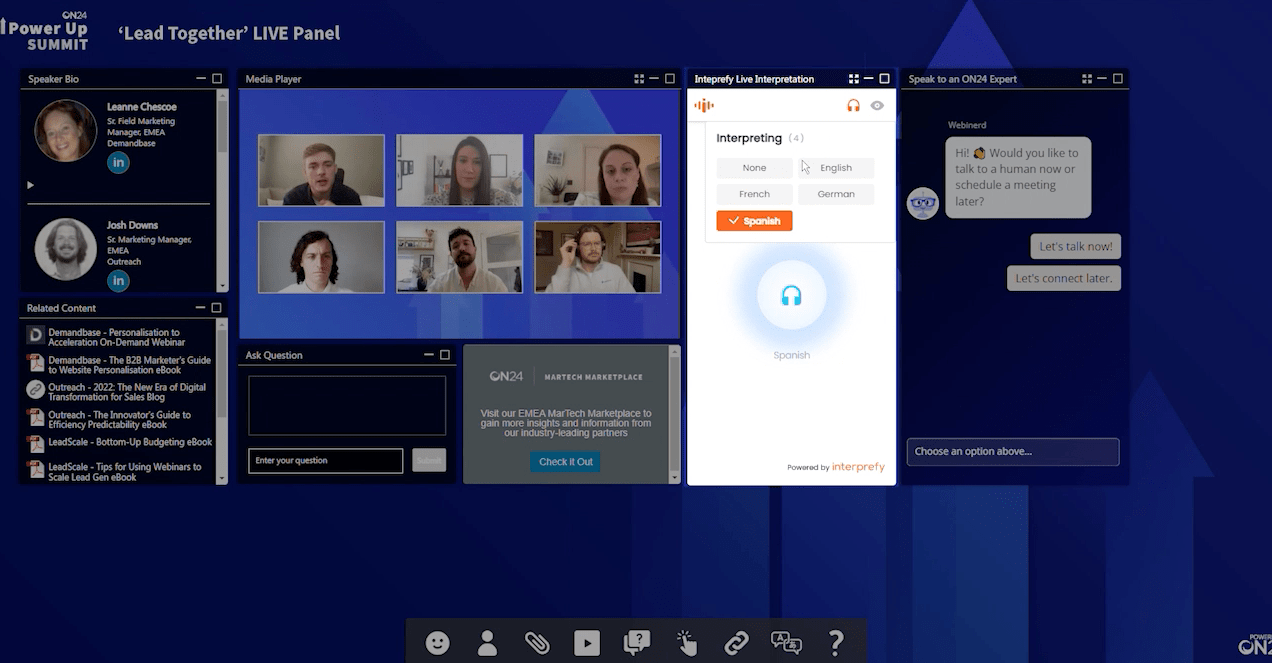
Example of the Interprefy widget within an ON24 event
Rather than asking you to move your webinar to a new tool, Interprefy partners with leading virtual event and web conferencing platforms to bring language interpretation to the platform you trust and love. Explore all Interprefy integrations.
How Language Interpretation Can Boost Your Webinar Reach
Companies use webinars to demonstrate products, onboard customers and train employees, while universities use them to teach students who can’t travel. When those audiences span several countries, offering your webinar in their languages helps you tap into new regions and markets, and turn more attendees into leads.
Webinar interpretation also allows companies to build engagement quickly, easily and at a relatively low cost. Today, you can combine remote simultaneous interpretation (RSI) by professional interpreters with AI speech translation and live captions and subtitles, so every attendee can follow in the way that suits them best. Together, they offer a range of benefits that help scale up webinars to global audiences:
1. Tailoring your content to your audience
When designing your webinar’s content, keeping in mind who you are addressing and tailoring your content accordingly remains imperative. Because of the global reach of webinars, tailoring your content to an international audience can be tricky, especially when language and cultural differences come into play.
You can start by establishing the knowledge level of your audience on the topic and work from there and, whenever possible, provide examples that can be understood internationally.
Additionally, you can have professional interpreters or AI speech translation convey your spoken message in different languages, in a way that relates closer to the attendees.
Localising your webinar content provides more than just better understanding. There is a great quote by Nelson Mandela that goes: “If you talk to a man in a language he understands, that goes to his head. If you talk to him in his own language, that goes to his heart.”
Tailoring your content to your international audience shows you care and can help build brand loyalty.
2. Facilitating audience engagement
Ideas and thoughts are always best expressed in one’s native language. Not all of us have a dozen languages in our back pockets and we might feel intimidated speaking up in a language we’re not fully proficient in.
Making your content available in more languages and allowing attendees to interact in their mother tongue can help break down that barrier, to make sure your audience can understand better, ask inspired questions and provide valuable feedback.
3. Making your content easily accessible
Inclusivity has become imperative and many webinar platforms today provide great accessibility tools for people with impaired sight or hearing. In addition, many of your attendees may log in from a location with great distractions. They might sit on public transport or dial in from a noisy restaurant.
Live captions and subtitles, generated by AI or from your interpreters’ renditions, can support accessibility in those instances. You can also offer sign language interpretation, so your webinar reaches even more people.
4. Allowing you to reuse your webinar content
One of the many benefits of webinars is that you can use that live content to feed your content marketing pipeline. Making the recording of the webinar available on demand increases the longevity of your webinar. You can turn your webinar content into blog articles, white papers or mini-clips.
Interprefy can also provide you with recordings that include the interpretation, so your content is ready to share in every language.
In a nutshell
In summary, interpretation, AI speech translation and live captions can help you:
- Make your webinar content available in multiple languages.
- Allow your peers to ask questions and engage in their own language during your Q&A session.
- Offer live captions and subtitles for individuals with impaired hearing or who are attending your webinar from a noisy location, such as a café.
- Make your multilingual webinar content available on demand with edited recordings of your webinar.
- Provide an integrated experience by combining interpretation and AI with your chosen webinar platform.


 Download from the App Store
 Download from Google Play
 More download links